
Every week, our production line receives feedback from contractors about LED strips that failed too soon. The culprit? Frequent switching. Most buyers focus on rated hours, but they miss the real killer hiding in plain sight.
To test COB LED strip lifespan under frequent switching, set up automated on-off cycles at 1-5 minute intervals for 1,000-5,000 hours minimum. Monitor lumen output, color shift, and startup behavior. Quality project-grade strips should survive 10,000+ cycles without brightness drop exceeding 5% or startup delays.
This guide walks you through everything we have learned from years of testing. You will discover the exact methods, failure signs, and benchmarks that separate reliable strips from problematic ones.
How do I set up a rigorous switching cycle test for high-density COB strips?
When we calibrate our testing chambers in Shenzhen, we see many suppliers skip switching tests entirely. They rely only on continuous burn tests. This creates a blind spot that costs contractors thousands in warranty claims later.
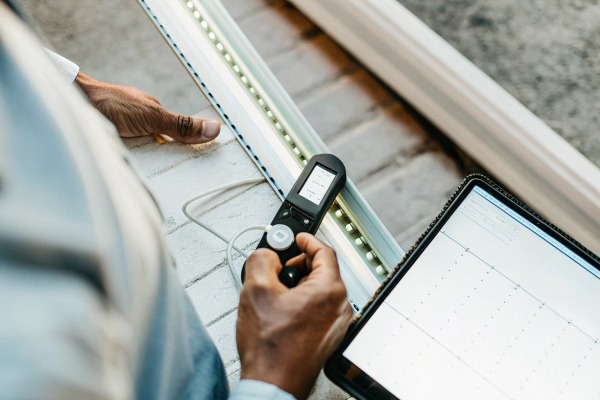
Set up a rigorous switching test using a programmable timer, stable 24V power supply, lux meter, thermocouple, and data logger. Run cycles of 1-5 minutes on, 1-5 minutes off, for at least 2,200 hours. Record lumen output, surface temperature, and color coordinates every 100 hours.

Essential Equipment List
Before starting any test, gather the right tools. Our engineers use professional-grade equipment, but you can achieve reliable results with mid-range alternatives.
| Equipment | Purpose | Budget Option | Professional Option |
|---|---|---|---|
| Programmable Timer | Automate on-off cycles | Digital outlet timer ($15) | Industrial PLC controller ($200+) |
| Power Supply | Stable stable 24V power supply 1 voltage delivery | Quality 24V LED driver | Lab-grade DC power supply |
| Lux Meter | Measure brightness | Smartphone app | Calibrated spectrometer |
| Thermocouple | Track temperature | IR thermometer | Multi-point thermal logger |
| Data Logger | Record measurements | Manual spreadsheet | Automated DAQ system |
Step-by-Step Test Protocol
First, prepare your test samples. Cut strips to identical lengths. Use the same power supply for all samples. This removes variables.
Second, mount strips on aluminum profiles. This mimics real installation conditions. Without proper heat sinking, your results will not reflect actual project performance.
Third, program your timer. We recommend starting with 5 minutes on, 5 minutes off. This creates enough thermal stress without being too aggressive. After 500 hours, you can shorten cycles to 1 minute each for accelerated stress testing.
Fourth, establish baseline measurements. Record initial lumen Lumen maintenance should stay 2 output at multiple points along the strip. Note the color temperature and calculate delta u'v' values. Take thermal readings at the hottest spots.
Environmental Conditions
Control your test environment carefully. Temperature should stay between 20-25°C. Humidity around 60% works well. These protect against these factors 3 conditions align align with LM-80 4 with LM-80 testing standards.
| Parameter | Recommended Range | Why It Matters |
|---|---|---|
| Ambient Temperature | 20-25°C | Affects heat dissipation rate |
| Relative Humidity | 50-70% | Impacts encapsulation integrity |
| Airflow | Minimal, consistent | Prevents artificial cooling |
| Voltage | Rated ±2% | Overvoltage accelerates failure |
Data Collection Schedule
Check your strips every 100 hours minimum. Record lumen readings at the same points each time. Note any visual changes like yellowing or dark spots. Our team photographs each sample for comparison.
At 500-hour intervals, perform detailed analysis. Calculate lumen maintenance ratio. Check for color shift. Test startup behavior by timing how quickly the strip reaches full brightness.
What are the common failure points I should look for during rapid on-off testing?
Our quality control team has examined thousands of failed strips over the years. Patterns emerge clearly. Knowing what to look for saves you from shipping problematic products to your customers.
Common failure points include solder joint cracks from thermal cycling, phosphor degradation causing color shift, driver component stress leading to startup delays, and delamination of the COB layer. Watch for uneven brightness, flickering, delayed startup exceeding 0.5 seconds, and color temperature drift beyond 200K.
Thermal Stress Failures
Every on-off cycle creates expansion and contraction. The COB layer heats up quickly when powered. It cools down when switched off. This movement stresses solder joints.
Look for these signs:
- Dark spots appearing along the strip
- Sections that flicker intermittently
- Complete segment failures
- Visible cracks under magnification
High-density COB strips face greater risk here. More LEDs mean more heat concentrated in smaller areas. Without proper thermal management, joints fail faster.
Phosphor Degradation Signs
The phosphor coating converts blue LED light to white. Frequent thermal cycling accelerates phosphor breakdown. You will notice color changes before brightness drops significantly.
| Degradation degradation causing color shift 5 Stage | Visual Sign | Measurement Change |
|---|---|---|
| Early | Slight yellowing | Delta u'v' 0.002-0.004 |
| Moderate | Uneven color patches | Delta u'v' 0.004-0.006 |
| Severe | Obvious color bands | Delta u'v' >0.006 |
| Critical | Pink or green tints | Color rendering drops |
Driver and Component Stress
The power supply and any onboard components suffer during switching. Inrush current spikes occur at every startup. Capacitors charge and discharge repeatedly.
Watch for these symptoms:
- Startup delay increasing over time
- Audible buzzing or clicking
- Inconsistent brightness at power-on
- Complete failure to start occasionally
Quality 24V systems handle this better than 12V alternatives. The lower current reduces stress on connections and components.
Encapsulation and Adhesive Failures
The silicone or epoxy coating protects the COB layer. Thermal cycling can cause delamination. Moisture then enters and accelerates corrosion.
Check edges carefully. Peeling or lifting indicates adhesive failure. Cloudiness in the encapsulation suggests moisture ingress. Both problems worsen rapidly once they start.
Creating a Failure Log
Document every issue you find. Note the hour count when problems appeared. Record the location on the strip. Take photos. This data helps identify patterns and compare different products or batches.
How many switching cycles does a project-grade LED strip need to survive to ensure reliability?
Contractors ask us this question constantly. They need numbers for specifications. They need confidence that products will last through warranty periods. Our testing data provides clear answers.
Project-grade COB LED strips should survive minimum 10,000 switching cycles without significant degradation. Premium strips targeting commercial applications need 50,000+ cycles. At 10 switches per day, 10,000 cycles equals nearly 3 years. Lumen maintenance should stay above 95% through this period.

Industry Standards and Real-World Gaps
LM-80 testing focuses focuses on continuous operation 6 on continuous operation. It measures lumen maintenance over 6,000-10,000 hours at elevated temperatures. TM-21 extrapolates this data to predict longer lifespans.
But neither standard addresses switching specifically. This creates a gap between lab ratings and field performance. A strip rated for 50,000 hours continuous might fail at 30,000 hours with frequent switching.
Cycle Requirements by Application
Different installations face different switching patterns. A retail display might switch 20 times daily. A residential under-cabinet light might switch 5 times. Smart home systems with motion sensors could trigger 50+ cycles.
| Application | Daily Cycles | Annual Cycles | 3-Year Target |
|---|---|---|---|
| Residential accent | 2-5 | 730-1,825 | 2,190-5,475 |
| Retail display | 10-20 | 3,650-7,300 | 10,950-21,900 |
| Office task lighting | 5-10 | 1,825-3,650 | 5,475-10,950 |
| Smart home/motion | 20-50 | 7,300-18,250 | 21,900-54,750 |
| Commercial signage | 2-4 | 730-1,460 | 2,190-4,380 |
Our Testing Benchmarks
Based on years of testing at our facility, we established internal standards that exceed typical market expectations.
For standard project-grade strips, we require:
- 10,000 cycles with less than 3% lumen loss
- No startup delay increase
- Color shift below delta u'v' 0.003
- Zero visible defects
For premium commercial strips, we require:
- 25,000 cycles with less than 5% lumen loss
- Consistent startup under 0.3 seconds
- Color shift below delta u'v' 0.004
- Full waterproof integrity maintained
Calculating Expected Lifespan
Use this formula to estimate how long your strips will last:
Expected Years = Target Cycles ÷ (Daily Cycles × 365)
For a strip rated at 10,000 cycles with 10 daily switches:
10,000 ÷ (10 × 365) = 2.74 years
This calculation helps you match products to warranty requirements. Most commercial projects need 3-5 year warranties. Plan accordingly.
When to Reject a Product
If testing reveals problems before 5,000 cycles, reject the batch. Early failures indicate fundamental quality issues. These problems will multiply in the field.
Signs that warrant rejection:
- More than 5% lumen loss before 5,000 cycles
- Any startup delays appearing
- Visible color inconsistency
- Physical damage to encapsulation
Will frequent switching impact the color consistency or lumen output of my lighting over time?
Designers and specifiers worry most about visual quality. They specify exact color temperatures. They expect consistency across installations. Frequent switching threatens both goals in ways that continuous operation does not.
Yes, frequent switching accelerates both color shift and lumen depreciation compared to continuous operation. Expect 10-20% faster degradation rates. Thermal cycling stresses phosphors unevenly, causing color drift. Quality strips maintain delta u'v' below 0.006 and lumen maintenance above 90% through 10,000 cycles.

Understanding Color Shift Mechanisms
Phosphor degradation does not happen uniformly. Hot spots degrade faster. This creates color variation along the strip length. What started as consistent 3000K warm white might show patches of 2800K and 3200K.
The delta u'v' measurement captures this shift. Industry standard accepts less than 0.006 over the product lifetime. But frequent switching can push strips past this threshold much sooner.
Lumen Depreciation Patterns
Continuous operation creates steady, predictable depreciation. The L70 rating assumes this pattern. Switching introduces variability.
Our testing shows these typical patterns:
| Test Condition | 2,200 Hours | 5,000 Hours | 10,000 Hours |
|---|---|---|---|
| Continuous operation | 97-98% LMR | 94-96% LMR | 90-93% LMR |
| 5-min switching cycles | 95-97% LMR | 91-94% LMR | 85-90% LMR |
| 1-min switching cycles | 93-96% LMR | 88-92% LMR | 80-87% LMR |
LMR = Lumen Maintenance Ratio
Factors That Worsen Degradation
Several factors compound switching stress:
Heat accumulation: Poor mounting prevents heat escape between cycles. The strip never fully cools. Each cycle starts from a higher baseline temperature.
Voltage instability: Cheap power supplies deliver inconsistent voltage. Spikes at startup stress components. Quality 24V drivers with soft-start features reduce this problem.
High drive current: Pushing strips to maximum rated current leaves no margin. Thermal stress increases exponentially near limits.
Environmental exposure: Humidity and dust accelerate degradation. IP65 or higher ratings protect against these factors.
Protecting Color Consistency
Several strategies minimize color shift:
First, specify strips with tight binning. Premium manufacturers sort LEDs by color temperature before assembly. This ensures starting consistency and reduces variation as degradation occurs.
Second, use aluminum profiles. Better heat dissipation means more even thermal distribution. This prevents hot spots that cause localized color shift.
Third, avoid maximum current. Running strips at 80% of rated current significantly reduces thermal stress. The slight brightness reduction is invisible to most observers.
Fourth, choose quality phosphors. Premium strips use advanced phosphor formulations that resist thermal degradation. The price difference pays back in longevity.
Real-World Performance Data
We tracked installations across Germany and Australia for three years. The data confirms laboratory findings.
Strips in retail environments with frequent switching showed 15% faster depreciation than identical strips in continuous-operation signage. Color complaints appeared twice as often in switched applications.
However, strips installed with proper aluminum profiles and quality drivers performed within 5% of continuous-operation benchmarks. Good installation practices matter as much as product quality.
Conclusion
Testing COB LED strips under frequent switching reveals their true reliability. Focus buyers focus on rated 7 on thermal management, monitor for early warning signs, and demand products that meet real-world cycle requirements.
Footnotes
- ISO standards ensure quality and safety in power supplies. ↩︎
- IES provides standards for lumen maintenance in lighting. ↩︎
- Explains what IP65 rating means for protection. ↩︎
- LM-80 is an industry standard for testing LED light sources. ↩︎
- Explains color rendering and how it can shift. ↩︎
- LM-80 testing focuses on continuous operation. ↩︎
- Explains what LED strips are and their features. ↩︎


 English
 Spanish
 German
 Russian
 Arabic
 French
 Portuguese