
Seeing a high-end lighting project dim prematurely is a nightmare for any contractor or distributor. In our production facility, we rigorously stress-test materials, but we know that field conditions can be unpredictable. When a client reports that their strips are losing brightness too fast, we need science losing brightness too fast 1, not guesses, to solve the problem. If you approach a supplier with vague complaints, you will likely face denial. However, presenting a structured request for technical analysis changes the dynamic immediately.
To request a credible technical analysis for rapid light decay, you must demand an LM-80 report and a TM-21 projection from the supplier for your specific batch. Explicitly ask for a root cause analysis that investigates phosphor oxidation, encapsulation yellowing, and thermal resistance. Ensure you provide your exact operating temperature (Ts) and drive current data to prevent them from dismissing the claim as user error.
Here is how you can systematically gather evidence and demand a professional response to resolve the issue effectively.
What evidence and testing data must I provide to prove the light decay issue to the factory?
Before we can open a dispute file or involve our engineering team, we need raw numbers rather than general observations. In my experience dealing with international claims, blaming the factory without proof often leads to a stalemate where the supplier simply blames your installation methods or power supply units.
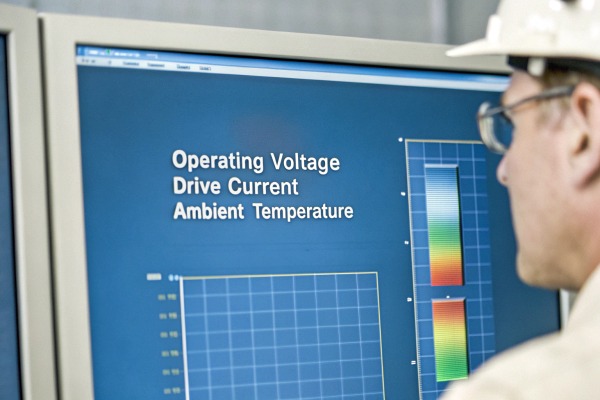
You must submit logs of the operating voltage, drive current, and ambient temperature measured directly at the installation site to rule out electrical overstress. Additionally, provide close-up photos of the decay pattern and request a comparison test between the returned failed samples and the retained "golden sample" from that specific production batch to isolate manufacturing deviations.

When you first notice the lights dimming, your immediate reaction might be to send an angry email. However, without specific data points, most Chinese suppliers will default to their standard defense: "The product was installed incorrectly." To bypass this, you need to build a data-backed case that proves the strip was operating within its rated limits.
The Importance of the "Golden Sample"
Every professional factory keeps a "retained sample" or "golden sample" from every production run. This is your most powerful tool. When you report a defect, demand that they take their retained sample from the same batch and run a parallel test. If their sample works fine but yours failed, the discussion moves to installation conditions. If their sample also fails, you have proven a manufacturing defect.
Key Metrics to Document
You need to measure the environment, not just the light output. Use a multimeter and a thermal probe.
- Voltage Drop: Measure voltage at the beginning and the end of the strip. If a 24V strip is receiving 26V, the decay is due to over-voltage, not a bad chip.
- Temperature (Ts Point): Locate the solder pad or the designated temperature measurement point (Ts) on the PCB. Measure this after 60 minutes of operation.
- Current Draw: Is the driver pushing more amperage than the spec sheet allows?
Comparing User Error vs. Factory Fault
Suppliers look for specific red flags to void warranties. certified Class 2 drivers 2 By preemptively gathering this data, you cut off their escape routes.
| Evidence Type | What the Supplier Looks For (To Blame You) | What You Must Prove (To Win the Claim) |
|---|---|---|
| Voltage Input | Spikes above rated voltage (e.g., >24.5V). | Input was stable and within ±3% of rated voltage. |
| Temperature | Scorch marks on the PCB or mounting surface. | Ts point temperature was <65°C (or within spec). |
| Power Supply | Cheap, non-constant voltage drivers. | Use of branded, UL/CE certified Class 2 drivers. |
| Visuals | Physical damage to the silicone or PCB. | Intact exterior with internal dimming or yellowing. |
Sending Samples Back
Photos are rarely enough for a final verdict. Be prepared to ship 1 to 5 meters of the faulty strip back to the factory. Label them clearly with the number of hours used. When we receive these returns, we put them through an integrating sphere to measure integrating sphere 3 exact lumen output compared to the original specification. If you have a light meter (lux meter), take your own readings before shipping to ensure your data matches their findings later.
How can I tell if the rapid dimming is caused by thermal management issues or low-quality chips?
Our R&D team often receives "burnt" strips that look like heat damage, but upon closer inspection, we find the chips are fine—it is the cheap glue that failed. Distinguishing between a hot installation and a bad chip is crucial because it determines whether you need to fix your heat sinking or fire your supplier.
Rapid dimming caused by thermal issues typically shows uniform darkening or scorched PCB backings, while low-quality chips or materials often manifest as color shifts (yellowing) or random section failures. Requesting a cross-sectional analysis can reveal if the substrate thermal resistance or wire bonding is the root cause versus external heat accumulation.
Understanding the physics of failure helps you write a stronger technical request. COB (Chip on Board) strips are dense; heat is their enemy. However, "heat" is a broad term. You need to know if the heat came from outside (poor dissipation) or inside (bad design).
Thermal Degradation Signs
If the problem is thermal management, the decay is usually consistent. The entire strip will look dimmer, and the PCB backing tape might look brown or brittle. This happens when the aluminum profile is too small or absent.
- The Physics: When the junction temperature (Tj) exceeds 120°C, the internal quantum efficiency drops junction temperature (Tj) 4 permanently.
- The Fix: You need better aluminum channels, not new chips.
Material Flaws (The "Hidden" Cheapness)
This is common in budget sourcing. The strip runs cool, but it still goes dark or turns yellow. phosphor powder settles 5 silver plating on the LED 6
- Phosphor Sedimentation: In cheap manufacturing, the phosphor powder settles unevenly in the silicone. This causes blue light to leak through or the light to turn green/yellow over time.
- Encapsulant Yellowing: High-quality COB uses silicone. Budget factories use Epoxy or PU (Polyurethane) glue. These materials turn yellow Epoxy or PU (Polyurethane) glue 7 under UV light or mild heat (>80°C). The chip is still bright, but the "lens" is dirty.
- Sulfuration: If the silver plating on the LED bracket reacts with sulfur in the air (or from rubber gaskets), it turns black. This looks like the LED burned out, but it is actually a chemical reaction.
Diagnostic Matrix for Buyers
Use this table to interpret what you are seeing before you email the supplier.
| Symptom | Likely Cause | Technical Analysis to Request |
|---|---|---|
| Strip turns Yellow/Brown | Low-quality Glue (Epoxy/PU) | VOC Compatibility Analysis or Material Composition Test (IR Spectroscopy). |
| Strip turns Blueish | Phosphor degradation | Phosphor Sedimentation Analysis. |
| Dark Spots (Dead Sections) | Broken wire bonds (flip-chip failure) | Cross-sectional Analysis (X-Ray) to check bonding integrity. |
| Back of PCB is Brown | Overheating (External) | None needed; improve your heatsink installation. |
| Silver parts turn Black | Sulfuration (Chemical attack) | Sulfuration Test or Silver Plating Inspection. |
The "Pulse Current" Factor
Sometimes the design itself is flawed. If the copper on the PCB is too thin (e.g., 1oz instead of 2oz or 3oz), the electrical resistance creates heat inside the traces. Ask the supplier for a Pulse Current Stress Test. This reveals if the internal circuit architecture is causing uneven current distribution, leading to localized hotspots that kill the LEDs one by one.
Should I request a formal 8D report or a standard failure analysis document from the engineering team?
When we handle large project claims, a simple email apology is not enough to restore confidence. We use structured problem-solving methods to ensure the issue is systemic and fixed. You should not settle for a "we will be more careful next time" response if your reputation is on the line.
You should request a formal 8D report if the failure rate exceeds acceptable limits or affects a critical project, as it forces the supplier to document root causes and permanent corrective actions. For minor, isolated incidents, a standard failure analysis report covering visual and electrical inspection is usually sufficient.

The term "8D" stands for the Eight Disciplines of problem-solving. It is a standard Eight Disciplines of problem-solving 8 in the automotive and electronics industries. Demanding this signals that you are a professional buyer who understands quality control processes.
When to Demand an 8D Report
Do not ask for this for a single failed strip. It is a resource-intensive document. Request it when:
- Failure rate exceeds 3% in a single batch.
- The defect is recurring across multiple orders.
- The failure caused significant financial loss (installation labor).
- The safety of the installation is compromised.
Anatomy of a Good Technical Report
If the supplier sends you a one-page Word document saying "Worker mistake, fixed now," reject it. A proper analysis must include:
- D2 (Problem Description): Detailed 5W2H (Who, What, Where, When, Why, How, How Much) analysis.
- D4 (Root Cause): This is the most critical section. It should drill down 5 levels of "Why." For example: "Light decayed" -> "Chip overheated" -> "PCB copper too thin" -> "Purchasing bought wrong spec" -> "BOM (Bill of Materials) error."
- D5 (Corrective Actions): Specific changes. Not "train workers," but "calibrate dispensing machine to pressure X."
Standard Report vs. 8D Report
Choose the right tool for the scale of the problem.
| Feature | Standard Failure Analysis | Formal 8D Report |
|---|---|---|
| Scope | Focuses on the specific returned sample. | Focuses on the entire production system. |
| Time to Complete | 3–5 working days. | 7–14 working days. |
| Content | Photos, electrical tests, conclusion. | Team formation, containment, root cause, long-term fix, verification. |
| Best For | Isolated incidents, clear user error check. | Systematic failures, batch-wide defects, high-value claims. |
| Cost to Supplier | Low. | High (Engineers' time). |
Analyzing the "Why"
If the report blames "fluctuation in power grid," be skeptical. If they admit to "phosphor batch variance" or "dispensing machine nozzle clog," that is a credible technical admission. You want to see that they have identified the process failure, not just the product failure. This gives you confidence to order again.
How do I negotiate replacements or compensation once the technical analysis confirms a product defect?
We value long-term partnerships, and most reputable factories do too. Resolving a claim is not just about getting money back; it is about determining if the supplier is honorable. Once the science proves the fault lies with the manufacturing, you have the leverage to discuss fair compensation.
Once a defect is confirmed, negotiate for free replacements of the faulty batch and cover shipping costs by leveraging the 8D report findings. If the failure caused significant project delays, use the technical evidence to push for partial labor compensation or credit towards future orders to mitigate your financial loss.

Negotiation becomes much easier when you have the technical analysis in hand. It moves the conversation from "I feel like this is bad" to "Your report confirms the phosphor failed." Here is how to structure your demand.
The Baseline: Replacements
Standard warranty terms (in the fine print) usually cover "repair or replace product only." They rarely cover labor.
- What to ask: Immediate air shipping of replacement strips. Do not accept "we will ship it with your next container." You need the fix now.
- The Leverage: If they hesitate, remind them that the LM-80 data or 8D report proves a manufacturing LM-80 data 9 breach. You can mention that you will have to disclose this quality failure to your local industry partners if not resolved.
Pushing for More: Shipping and Labor
While factories hate paying for labor (installation costs), you can sometimes get credits.
- Shipping Costs: The supplier must pay for the shipping of the replacements. This is non-negotiable if the defect is theirs.
- Labor Compensation: This is hard to get in cash. Instead, ask for "Commercial Value Credit." For example, if the replacements cost $500, ask for a $500 credit on your next order to help cover your labor loss. It is easier for a salesperson to approve a discount than a cash payout.
Future-Proofing the Relationship
Use the negotiation to tighten your next contract.
- Add a Penalty Clause: "If decay >10% in 1000 hours, supplier pays liquid damages."
- Define the Test Standard: "Acceptance based on LM-80 standards."
- Third-Party Verification: For orders over $10,000, insist on sending random samples to a lab like SGS or Intertek in Shenzhen before SGS or Intertek 10 shipment.
Compensation Tiers
Use this guide to set realistic expectations based on the severity of the issue confirmed by the analysis.
| Defect Severity | Reasonable Ask | Reach Goal (Hard Negotiation) |
|---|---|---|
| Isolated (<1%) | Replacement of specific broken units + Free shipping. | Extra spare units (5%) for future use. |
| Batch Failure (10-30%) | Full replacement of the batch + Air freight. | Credit for re-installation labor (partial). |
| Critical System Fail | Full refund + Return of goods at supplier expense. | Consequential damages (lost project penalty). |
Conclusion
Sourcing COB strips from China requires vigilance. Rapid light decay is rarely a mystery; it is physics. By moving beyond complaints and requesting specific technical documents like LM-80 reports, 8D analyses, and cross-sectional studies, you force the supplier to treat you as a serious technical partner. Document your voltage and temperature data, identify whether the issue is thermal or material-based, and use the findings to negotiate fair compensation. This rigorous approach not only solves the current problem but filters out low-quality vendors, ensuring your future lighting projects stand the test of time.
Footnotes
- Official DOE resource explaining LED lifetime standards and reliability factors. ↩︎
- Official safety standards for low-voltage power supplies in lighting. ↩︎
- NIST laboratory details on integrating spheres used for precise light measurement. ↩︎
- Technical article explaining the critical role of junction temperature in LED performance. ↩︎
- General background on the luminescent substances used in LED manufacturing. ↩︎
- Background on the silver coating used in LED components that is susceptible to chemical attack. ↩︎
- Scientific overview of polyurethane adhesive properties and material science. ↩︎
- Definition of the 8D methodology by the American Society for Quality. ↩︎
- Official IES standards page referencing LM-80 testing protocols. ↩︎
- Official website of SGS, a major third-party inspection and testing organization. ↩︎



 English
 Spanish
 German
 Russian
 Arabic
 French
 Portuguese